
Checkpoints
When subscribing to an event store, it is important to consider which events you wish to receive. An effective event store should allow you to subscribe to individual event streams or to a global stream known as the “All stream”, which contains all events in the store, organized in the order they were recorded. Many event-driven brokers that persist events as ordered logs also support subscriptions, which are often referred to as “consumers”.
The subscription you choose will determine at what point in the stream you begin to receive events. If you want to process all historical events, it is necessary to subscribe from the beginning of the stream. However, if you only wish to receive real-time events, it is necessary to subscribe from the current point in time.
What’s the checkpoint?
Section titled “What’s the checkpoint?”As the subscription receives and processes events, it progresses along the subscribed stream. Each event that is received and processed has a unique position within the stream, which serves as a checkpoint for the subscription. If the application hosting the subscription shuts down, it is necessary to resume processing events from the last recorded checkpoint, which is the position of the last processed event plus one. This ensures that each event is handled exactly once. As a result, the subscription must keep track of its checkpoint, either by storing it in a dedicated checkpoint store or by using the event store’s built-in functionality.
In some log-based brokers, the concept of a checkpoint is referred to as an “offset”. Some event-driven brokers manage subscriptions on the server-side, eliminating the need for client-side checkpoint storage. For example, persistent subscriptions in KurrentDB and subscriptions in Google PubSub do not require a client-side checkpoint store. Other subscriptions, such as those managed by RabbitMQ, do not have the concept of a checkpoint as RabbitMQ does not retain consumed messages, whether they have been acknowledged or not.
Checkpoint store
Section titled “Checkpoint store”Eventuous offers an abstraction layer that enables subscriptions to store checkpoints securely and reliably. You can choose to store the checkpoint in a file or database and determine the frequency at which you wish to store the checkpoint, whether after processing each event or periodically. Although periodic checkpoint storage reduces the stress on the infrastructure supporting the checkpoint store, it requires the subscription to be idempotent. This can be challenging, especially in integration scenarios where it is often difficult or impossible to determine if an event has been published to the broker or not. However, this approach may work for read model projections.
On top of the abstraction Eventuous provides a few implementations of the checkpoint store, which you can use out of the box. You can also implement your own checkpoint store if you need to store the checkpoint in a custom location.
Abstraction
Section titled “Abstraction”The checkpoint store interface is simple, it only has two functions:
interface ICheckpointStore {    ValueTask<Checkpoint> GetLastCheckpoint(        string checkpointId,        CancellationToken cancellationToken    );
    ValueTask<Checkpoint> StoreCheckpoint(        Checkpoint checkpoint,        CancellationToken cancellationToken    );}
The Checkpoint record is a simple record, which aims to represent a stream position in any kind of event store:
record Checkpoint(string Id, ulong? Position);Available stores
Section titled “Available stores”If a supported projection type in an Eventuous package for projections requires a checkpoint store, you can find its implementation in that package. For example, the Eventuous.MongoDB package has a checkpoint store implementation for MongoDB.
If you register subscriptions in the DI container, you also need to register the checkpoint store:
builder.Services.AddSingleton<IMongoDatabase>(Mongo.ConfigureMongo());builder.Services.AddCheckpointStore<MongoCheckpointStore>();In case you have multiple subscriptions in one service, and you project to different databases (for example, MongoDB and PostgreSQL), you need to specify the checkpoint store for each subscription. In this case, you don’t need to register the checkpoint store globally in the DI container, but use the UseCheckpointStore method when building your subscription:
builder.Services.AddSubscription<AllStreamSubscription, AllStreamSubscriptionOptions>( "BookingsProjections", builder => builder .Configure(cfg => cfg.ConcurrencyLimit = 2) .UseCheckpointStore<MongoCheckpointStore>() .AddEventHandler<BookingStateProjection>() .AddEventHandler<MyBookingsProjection>() .WithPartitioningByStream(2));MongoDB
Section titled “MongoDB”The MongoDB checkpoint store will create a collection called checkpoint where it will keep one document per subscription.
Each checkpoint document contains the checkpoint id, which is the subscription id. Therefore, you only get one checkpoint collection per database.
Elasticsearch
Section titled “Elasticsearch”The Elasticsearch checkpoint store will create and use the checkpoint index, and the document id there would be the subscription id.
PostgreSQL
Section titled “PostgreSQL”The Postgres checkpoint store will create and use the checkpoint table, and the row id there would be the subscription id. Here is the script used to create that table:
create table if not exists __schema__.checkpoints ( id varchar primary key, position bigint null);SQLite
Section titled “SQLite”The SQLite checkpoint store uses a {schema}_checkpoints table (default: eventuous_checkpoints), with the subscription id as the row key. The table is created automatically when initializeDatabase: true is set.
Other stores
Section titled “Other stores”In addition to that, Eventuous has two implementations in the core subscriptions package:
MeasuredCheckpointStore: creates a trace for all the IO operations, wraps an existing storeNoOpCheckpointStore: does nothing, used in Eventuous tests
The measured store is used by default if Eventuous diagnostics aren’t disabled, and you use the AddCheckpointStore container registration extension.
Initial position
Section titled “Initial position”When a subscription starts for the first time and no checkpoint exists, it needs to decide where to begin reading events. By default, subscriptions start from the earliest position (the beginning of the stream). You can change this behaviour using the StartFrom option on any subscription that uses checkpoints:
builder.Services.AddSubscription<MySubscription, MySubscriptionOptions>( "MySubscription", b => b .Configure(cfg => cfg.StartFrom = InitialPosition.Latest) .AddEventHandler<MyHandler>());| Value | Description |
|---|---|
InitialPosition.Earliest | Start from the beginning of the stream (default). Processes all historical events. |
InitialPosition.Latest | Start from the current end of the stream. Only processes events produced after the subscription starts. |
Checkpoint commit handler
Section titled “Checkpoint commit handler”In addition to checkpoint store, Eventuous has a more advanced way to work with checkpoints. It doesn’t load or store checkpoints by itself, for that purpose it uses the provided checkpoint store. However, the commit handler is able to receive a stream of unordered checkpoints, reorder them, detect possible gaps, and only store the checkpoint that is the latest before the gap.
For subscriptions that support delayed consume (see Partitioning filter) and require a checkpoint store, you must use the commit handler. All such subscription types provided by Eventuous use the checkpoint commit handler.
Unless you create your own subscription with such requirements, you don’t need to know the internals of the commit handler. However, you would benefit to know the consequences of delayed event processing with supported subscriptions.
When events get partitioned by the filter, several consumer instances process events in parallel. As a result, each partition will get checkpoints with gaps. When partitioned consumers process events, they run at different speed. Each event inside DelayedConsumeContext is explicitly acknowledged, and when it happens, the checkpoint gets to the commit handler queue. The commit handler then is able to accumulate checkpoints, detect gaps in the sequence, and only store the latest checkpoint in a gap-less sequence.
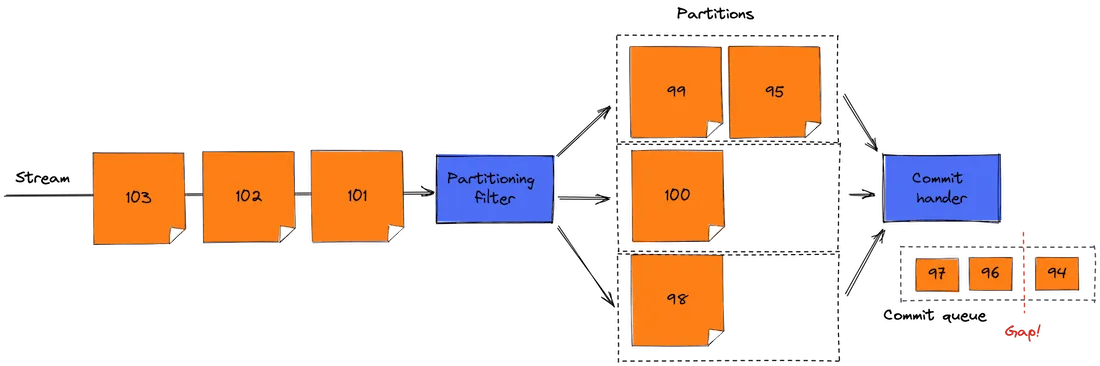
As we talk about gaps, you might face a situation when the commit handler has a list of uncommitted checkpoints with gaps, and the application stops. When this happens, some events were already processed, whilst checkpoints for those events remain in-flight. When the application restarts, it loads the checkpoint that points to some position in the stream that is earlier than positions of already processed events. Because of that, some events will be processed by event handlers again. Therefore, you need to make sure that your event handlers are idempotent, so when the same events are processed again, the result of the processing won’t create any undesired side effects.